

Update roundup: May 29, 2026
Assign a group (or any entitlement) as the owner of an app or entitlement
You can now use any entitlement to define app or entitlement ownership. When you add an entitlement (such as a group or a role) as an owner, everyone currently assigned that entitlement automatically becomes an owner, and ownership updates dynamically as users have that entitlement granted to or removed from their account.See Manage app owners and Manage entitlement owners for details.Access profile entitlements grouped by app
For clarity and better organization, the entitlements in an access profile are now grouped by app on the profile’s Apps tab. Click the pencil icon next to an app to adjust which of its entitlements are in the profile, or click Manage to add or remove apps from the profile entirely.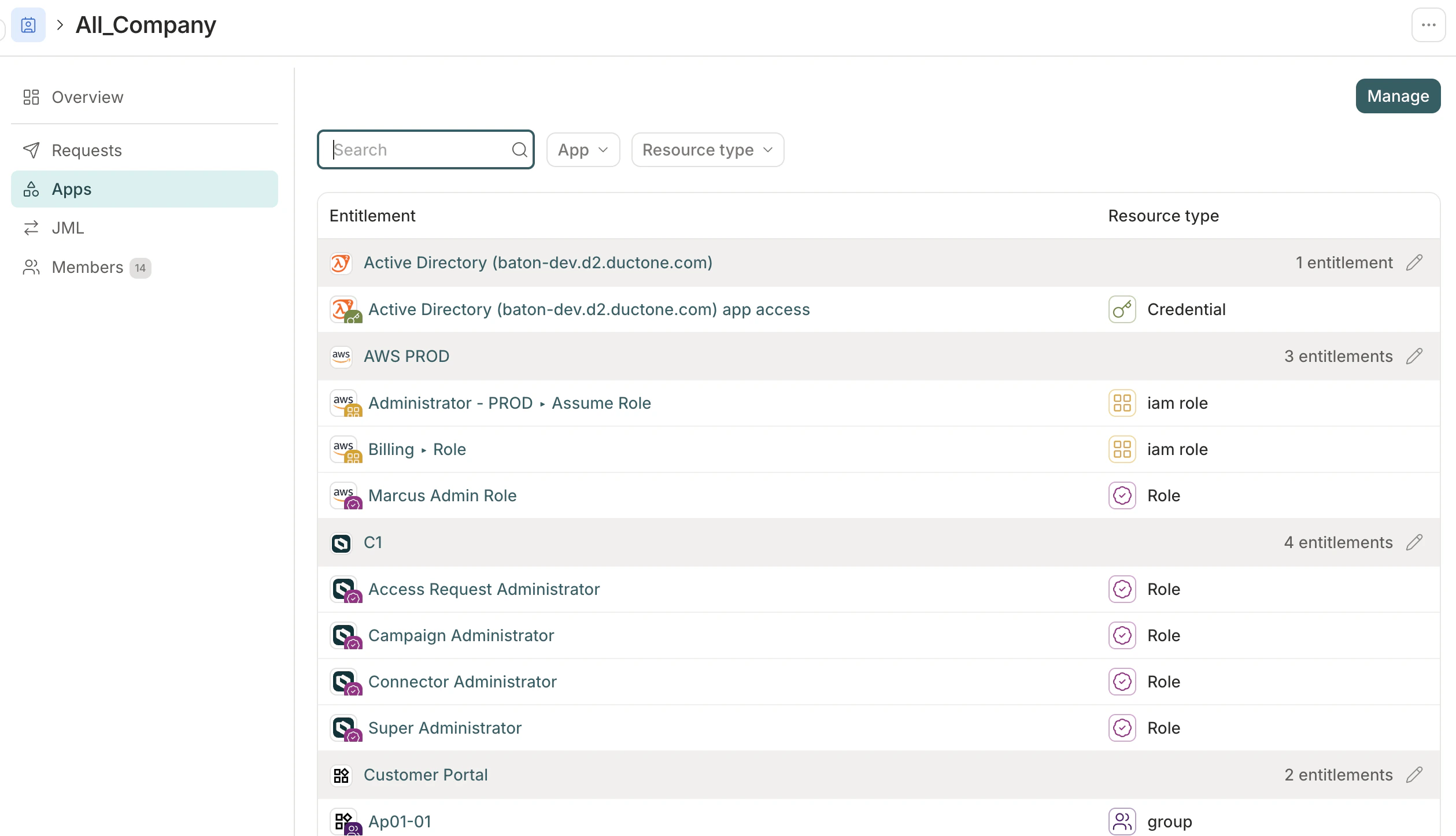
Reviewer attribute visibility on access reviews
Admins can now surface select app user profile attributes in an access review to give reviewers the context they need to make review decisions. Configure specific attribute keys per app in the campaign or template — for example, surface department and manager while keeping personal email hidden. Reviewers see no profile attributes by default; attributes are only shown in reviews when an admin has explicitly enabled them.AIAM improvements
- Shared or per-user credentials for HTTP basic auth: MCP servers using HTTP basic auth can now be configured in two modes: Shared (admin authorizes), where all users connect using a single set of admin-entered credentials, or Per-user (each user submits their own), where each user provides their own credentials so MCP requests run under their individual identity.
- Featured and popular MCP tools: The tools list on an app’s MCP server now opens to a curated view of Featured and Popular tools, organized by classification. A Visibility column also appears in every MCP tool table alongside Classification.
Usability improvements
- Centralized Forms page: The new Forms page lists every entitlement request form in your tenant in one place, so admins can browse and edit forms without opening each entitlement individually. See View and manage all forms for details.
- Recently visited items: The Governance left nav now shows a Recent list of campaigns, policies, and access profiles — pin any item to keep it at the top across sessions. The Directory and Workflows nav panels also show recently visited users, groups, automations, and functions.
- Access-only option in revocation automation steps: Revoke steps in automations now include an Access only option, which targets just the access entitlement on an app. In offboarding automations, this removes the user’s app account without generating downstream revoke tasks for entitlements that are automatically dropped when account access is removed.
- External ticket column in campaign reports: Campaign reports now include an optional External Ticket column for tenants with external ticketing enabled. Enable the column from the custom column picker when generating a report.
Terraform provider v1.4.0
Version 1.4.0 of the C1 Terraform provider is now available. This release addsannotations support to most writable resources — the provider automatically populates managed_by and iac_workspace annotations, and user-supplied values always take precedence.Breaking change: conductorone_access_profile.grant_policy_id is removed from both the resource and data source. Grant policy is now managed via AppEntitlement.grant_policy_id.See the Terraform provider’s documentation for details.Expanded analytics dashboard
The Analytics dashboard now surfaces significantly more data about your environment, organized across six categories: Access, Reviews, Identity, Security, Operations, and AI & MCP. Navigate to Explore > Analytics to try it out.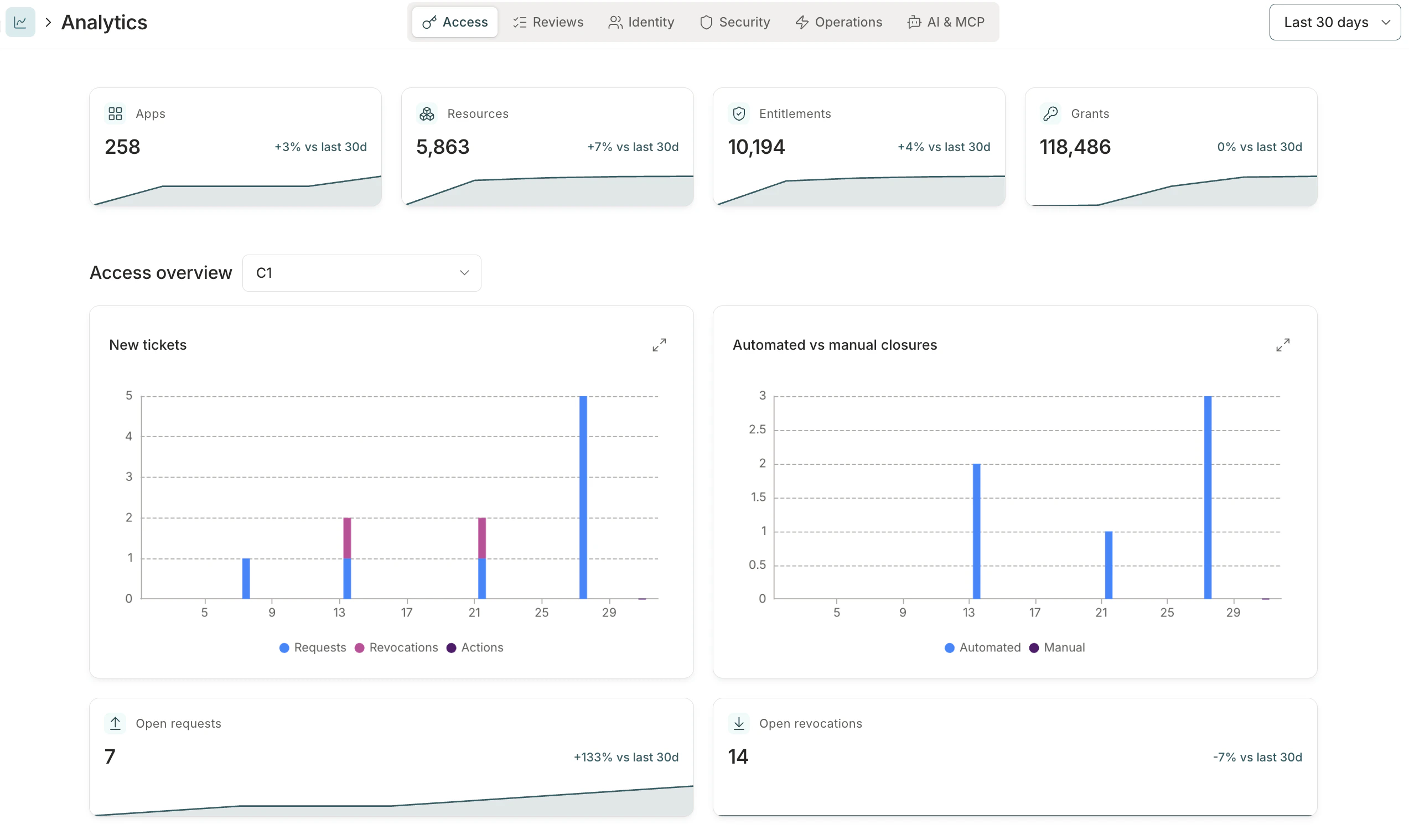
Update roundup: May 15, 2026
Automation circuit breaker
Automations triggered by directory or connector sync events can fire at unexpectedly high volume during bulk imports or data quality issues. The circuit breaker lets you set a rate limit on any automation: if it runs more than a configured number of times within a set period, C1 pauses it and queues new trigger events for review rather than running them.See Automation circuit breaker for configuration details.Object annotations
You can now attach custom key/value metadata to policies, apps, app entitlements, app resources, access profiles, automations, and access review templates — through the C1 UI, API, or Terraform provider. Use annotations to track cost centers, compliance scope, ownership, or any other context your team needs.Objects managed by Terraform, OpenTofu, or Pulumi display a Managed by chip on their detail page, so anyone opening the object in the UI knows it’s IaC-managed before making changes. Editing an IaC-managed object in the C1 UI transfers ownership to C1.See Object annotations for details.Usability improvements
- Metrics cards now appear across the app, giving you a quick read on total item counts, 30-day trends, and recent activity volume without having to open individual records.
- Application Administrators can now manage MCP servers, tools, and access profiles for apps they own, without needing the Integration Administrator or Super Administrator role.
- The Managed applications list now includes a Sync status column showing connector health for each app. Select a status chip to see connector details or sync history; for apps with more than one connector, a side panel lets you drill into each.
- Access review task lists now support an optional Account username column. Enable it from the column picker on any review view, or set it as a default in a campaign’s column configuration.
-
Policy step approver expressions can now use
c1.directory.apps.v1.GetEntitlementOwnersto route approval tasks to the owners of the entitlement being requested. Pass in theentitlementvariable or specify an explicit(app_id, entitlement_id)pair to get the list of entitlement owners — so approvals reach the right people without requiring app-wide ownership grants. - You’ll now find a Pause sync button at the top of each connector’s detail page. When you disable all resource types on a connector, C1 now prompts you to pause the connector instead of saving an empty configuration.
AI access management
AI tools used by your team can now be governed through the same identity platform you use for application access. When AI access management (AIAM) is enabled, every tool call from an MCP-compatible AI client routes through C1’s identity-aware proxy, which authenticates the caller, enforces access policies, and logs the call with full identity context — closing a gap that most organizations currently have no visibility into.Admins register MCP servers from a catalog of 3,000+ integrations, review and approve individual tools, bundle approved tools into toolsets, and bind toolsets to access profiles with the standard C1 request and approval workflow. Downstream credentials are vaulted in C1 and never stored on end-user devices.AIAM requires activation. Contact C1 Support to enable it for your tenant.See AI access management overview to get started.
Update roundup: May 1, 2026
Schedule automation trigger
Automations now support a Schedule trigger that runs on a recurring schedule without targeting a specific user. Use it for periodic tasks like generating reports, triggering syncs, or running system maintenance workflows. The trigger can be configured to run hourly, daily, weekly, or monthly with timezone support.See Automation triggers reference for details.Azure Blob Storage as an external data source
Azure Blob Storage is now supported as an external data source. Admins can configure an Azure Blob container to push audit logs to offline storage or a SIEM, or to ingest application data from CSV uploads. See Set up an Azure Blob Storage data source.Usability improvements
- You can now set an application group’s visibility to Everyone, Members, or Owners to control who can see the group and its entitlements. See Resource visibility controls for details.
- The Send Slack message automation step can now send direct messages in addition to channel posts. Choose Direct message as the destination and specify recipients by selecting the subject user, entering specific usernames, or writing a CEL expression for dynamic targeting.
- The Automations page now includes an Executions tab with a combined log of all automation runs across your organization. Filter by automation, status, or app to find specific runs without opening each automation individually.
- The C1 Slack app has a new name and logo. Use @C1 instead of the now-retired @ConductorOne to mention or message the app in your workspace.
- Reviewers can now switch to a By resource view when completing access review tasks. The resource view groups assigned tasks by resource, making it easier to make consistent decisions about access to a specific application or resource.
- Campaign reports now support custom column selection. When generating a report, choose between the default column set or a custom set that adds any combination of Employee ID, Job title, Department, Employment status, Employment type, and Manager.
- Users can now revoke their own membership in a time-bound access profile before it expires, as long as they have permission to request that profile. Previously, early revocation returned an error. To revoke, open the access profile and select Revoke access.
- The C1 Slack app now supports Enterprise Grid org-wide installs. When an org-wide app is installed, it handles messages and interactions from any workspace in the enterprise without needing separate workspace-level installations.
AI connections
You can now connect AI assistants — including Claude Desktop, Claude Code, Codex, Cursor, and VS Code — to your C1 data using the Model Context Protocol (MCP). Connected assistants can query users, resources, entitlements, access reviews, and more. All queries are read-only and logged in the system log.A Super Admin must enable AI connections before users can connect. Optional IP restrictions let you limit which networks can use the feature.See C1 MCP for setup instructions.
External insights with Wiz Insights
C1 can now sync security issues from Wiz and surface them in context across C1. Reviewers see identity-level security findings for user and service accounts directly on access review tasks, in the task log, and on access request approval tasks — without leaving C1.External insights are enabled automatically once the Wiz Insights connector is configured and syncing. No additional setup is required. To get started, see Set up a Wiz Insights connector and External insights.
Early access: c1i
c1i is a new command-line interface for C1 designed for use by AI agents and automation tooling. It provides structured NDJSON output, built-in API documentation you can query without credentials, and automatic pagination — making it easy to integrate C1 data into scripts, pipelines, and agent workflows.c1i is available now at github.com/ConductorOne/c1i. See Install c1i for setup instructions. For a human-friendly CLI experience, see Cone.
Update roundup: April 17, 2026
Password management automation steps
Three new automation steps are now available: Generate password, Set credential (early access), and Store credential. Use them together to generate a secure password, apply it to an account in a self-hosted application, and securely store it — then deliver it to the account holder’s manager via a one-time secret link.See the automation steps reference and the new account provisioning example.Custom merge matching for directories
Admins can now configure custom merge matching rules for each directory, to control how C1 links directory accounts to C1 users. Instead of the default email and employee ID matching, you can define an ordered list of rules that pair directory account fields with C1 user fields — choosing from primary email, all emails, username, display name, and employee ID. Rules support optional email normalization and custom CEL expressions for advanced cases.See Configure merge matching for details.Notification settings
Admins can now set organization-wide notification defaults and control whether users can override them. Configure the default digest frequency and notification types for your organization, then lock individual settings to enforce them across all users — or leave them unlocked so users can adjust to their own preferences.See Tenant notification settings and Your notification settings for details.Organization contacts
Admins can now set and manage organization contacts under Settings > Organization. The Contacts section supports three categories — Security, Billing, and Operations — each with up to 20 email addresses. Super Admins can edit all contact categories; other admins can view the configured lists.See Organization contacts for details.Usability improvements
- The access profile experience has been updated with a clearer layout, an overview tab, and streamlined editing for self-service, membership automation, and joiner and leaver (JML) settings.
- The Add connector page is now a card grid. Each connector appears as a card with its icon, name, and an Add button, along with a short description and a link to its documentation. Beta and v2 connectors are labeled with a badge.
- When using external ticket templates, a new Requested by field is available for including requester details — name, email, job title, and department — in ticket titles, descriptions, or custom fields.
- Entitlement names in Slack and Microsoft Teams notifications are now more consistent. When multiple entitlements exist on the same resource, notifications show both the resource name and the specific entitlement — for example, “Engineering Team — admin” rather than just “Engineering Team”.
-
App entitlements and resources now include an
external_idfield containing the native identifier from the connected application — for example, an Okta group ID or a Google Workspace role ID.
ConductorOne is now C1
We’ve always been C1 — now our name matches. You’ll notice a new logo, updated colors, and refreshed visuals across the product. Nothing about how C1 works has changed.
tenant.conductor.one) stays the same, and there’s nothing you need to do. Read our announcement for the full story.Update roundup: April 3, 2026
Access review improvements
The reviewer experience has been redesigned for clarity and speed. Recommendations now appear as text labels — Approve, Deny, or Look closer — so you can scan your task list and make decisions without hovering over icons. User details open in a drawer rather than expanding inline, keeping your working view clean as you move through reviews. The AI review assistant is now a persistent button at the bottom-right of the page, always accessible without leaving your queue. And you can switch between views and hide completed tasks in the menu bar at the top of the screen.For campaign administrators, the campaign setup flow has been streamlined with clearer labels and a more focused path through the essential configuration, so you can scope and launch a campaign more quickly.See Create a campaign and Complete access review tasks for details.Use Cone with AWS SSO
Cone, the C1 CLI, now supports AWS IAM Identity Center (SSO). Runcone aws setup once to generate AWS CLI profiles for every permission set available to you in C1, then use your normal AWS CLI workflow — Cone handles access requests and credential fetching in the background. See Use Cone with AWS SSO for setup instructions.Resource visibility controls
Admins can now control the visibility of resources and their entitlements. Each resource has a new Visibility setting: Everyone (default), Members (users with an active grant, plus owners), or Owners (app, resource, and entitlement owners only). Restricted resources are hidden from users who don’t qualify, and Super Admins can always see everything. See Resource visibility controls for details.Usability improvements
-
The
appDisplayNamefield is now available in the trigger context for Grant found and Grant deleted automation triggers. - Confirmation messages and alert notifications now appear at the top center of the screen instead of the top right. This makes them more noticeable and less likely to be missed, especially for important alerts.
Security
- OAuth provider issuer URLs must now use HTTPS. Attempting to configure an OAuth provider with an HTTP issuer URL will return an error. This prevents accidental use of unencrypted endpoints.
- Policy evaluation failures in resource search operations now return an error instead of silently allowing access. This ensures that transient errors or misconfigured policies don’t inadvertently expose resources.
Early access: Role mining
Role mining analyzes your organization’s access patterns and surfaces suggested access profiles based on what it finds. Instead of building access profiles by hand, you can let C1 identify which entitlements are commonly held by similar groups and turn those patterns into ready-to-use profiles with just a few clicks.C1 offers two ways to use role mining:
- Suggestions: Recommended profiles surface automatically after each connector sync.
- Custom analysis: Define a specific cohort and analyze that group’s access patterns on demand.